


EZ Manga: Webtoon & Manhwa
3.44.00 Reviews
App Specs
- Version
- 1.0.50
- Updated On
- License
- Free
- Downloads
- 10,000+
- Developer
- EZ Apps Studio
- Categories
- Comics
- Platform
- Android
Screenshots
 Analysis by AppCompare
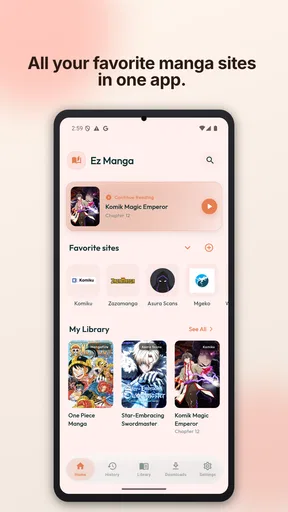
I started using EZ Manga with a simple household problem in mind: several people wanted a convenient way to read manga, webtoons, and manhwa on mobile, but not everyone needed the same reading routine. One person might want a quick chapter during a commute, while another prefers a longer evening session. A browser can handle the basics, yet it often becomes messy when open tabs, reading positions, and different tastes all collide. This app takes a more focused approach by putting manga browsing and reading in one place.
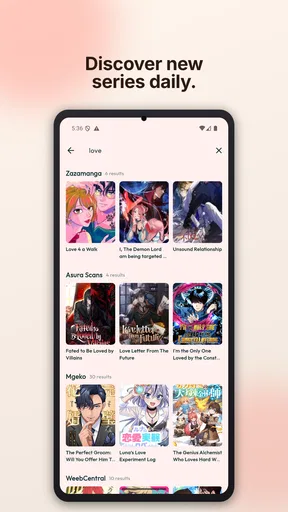
My first impression was that EZ Manga is best understood as a reading companion rather than a complete social or family library. It comes from EZ Apps Studio and sits in the Comics category, with a store summary that emphasizes smart browsing, reader mode, and synchronization. Those three ideas explain the app’s appeal: finding something to read, making the page easier to follow, and keeping progress more convenient across use. The experience is aimed at people who already read digitally and want less friction than a normal mobile browser.
It is free to install, which makes trying it on a shared Android device fairly easy. The app is marked Mature 17+, so I would not treat it as a general children’s comics app or hand it to younger readers without checking what they may access. Its current version is 1.0.50, and it runs on Android 7.0 or later. That broad system requirement is useful for households with an older spare phone or tablet, although the age context matters much more than the hardware age when deciding who should use it.
How EZ Manga works in a shared household
I’d treat EZ Manga as a personal reading app first, even when it sits on a tablet everyone uses. Before sharing it, I’d agree on who is responsible for purchases and whether readers are comfortable with their browsing and progress being visible to others. That small conversation helps avoid turning a convenient comic reader into a source of household mix-ups.
A practical evening reading scenario
Imagine a household with one Android tablet in the living room. One reader uses it after dinner for webtoons, another picks it up later for manga, and a third person occasionally wants to browse manhwa recommendations. EZ Manga can make that arrangement feel more organized than leaving several browser tabs open. The dedicated comic-reading focus means the device has a clear purpose, and reader mode is more relevant here than the usual browser controls that compete for screen space.
The important limitation is that a shared device is not automatically a shared account. I would not assume that synchronization creates separate reader identities, separate libraries, or private boundaries between household members. If several people use the same account or the same app session, their activity may become difficult to distinguish. Before making the tablet a family reading station, I would decide whether everyone is comfortable with that overlap and whether each person should instead use their own device or account arrangement.
This distinction is easy to overlook because a sync feature sounds like a household convenience. In practice, synchronization is most useful when one person moves between devices and wants continuity. It is less naturally suited to several people mixing their reading histories. My advice is to treat the app as a personal reading space first and a shared-device app second. A common tablet can work, but only when the household agrees on how browsing, saved items, and progress will be handled.
Worth Reading Before You Choose

Flipboard Shows What News Apps Must Do Beyond the Feed

Switching to Android Auto Means Rethinking Your Driving Routine

Google Calendar Makes a Crowded Week Easier to Manage

Ludo King Makes the Most of the Minutes Between Plans

Baby Panda World Brings Quick Play to Modern Phones, but Its Game Library Feels Busy

ESPN’s Live Game View Makes Following Close Games Easier
Setting boundaries before anyone starts reading
For a personal phone, setup is straightforward: install the app, explore the catalog, and see whether its browsing and reading style suits you. On a household device, I would take a few extra minutes before handing it around. Decide who is the primary user, whether the device has a screen lock, and whether other people can open the app without supervision. These are not special EZ Manga controls; they are sensible boundaries for any mature-rated reading application used by more than one person.
The Mature 17+ label should shape the conversation from the beginning. Parents or guardians should not interpret the app’s comic format as a guarantee that every title is suitable for younger readers. A comic reader can contain material aimed at adults, and the app’s age context is a clear reason to keep access aligned with the reader’s age. I would especially avoid installing it on a child’s unsupervised tablet simply because the child already enjoys animated shows or graphic novels.
There is also a practical privacy boundary. If a phone is regularly passed between partners, roommates, or relatives, browsing choices can become visible through the app’s normal use. Someone looking for a title may see what another person has recently explored or left open. I would not call that a flaw unique to this app; it is a consequence of sharing one reading environment. Still, it is worth recognizing before the household starts treating synchronization as a substitute for separate profiles.
Coordinating reading without creating clutter
Coordination works best when the household keeps expectations simple. I would suggest one person uses the app as the main reader on the shared device, while others use their own phones whenever they need a private or uninterrupted session. That arrangement reduces accidental progress changes and makes the sync feature more predictable. If everyone must use the same tablet, agreeing not to open another person’s unfinished chapter is a small rule that prevents unnecessary confusion.
A useful routine is to finish a reading session by returning to a neutral browsing screen rather than leaving a mature title open. That does not add a parental control, and it does not hide activity, but it avoids an awkward handoff when someone else picks up the device. It also makes the next session feel less like taking over another person’s place. I found this kind of habit more valuable than trying to force one shared library to serve several different reading styles.
For a couple or a group of adult roommates, the app can also work as a casual discovery tool. One person can mention a series, another can search for it later, and the reader mode can make a short break more comfortable than reading through a cluttered web page. The trade-off is that coordination depends on communication. I would not choose EZ Manga as the central household catalog if the main goal is strict organization by person, because the app’s strongest idea is convenient reading continuity, not household administration.
What synchronization is good for—and where it becomes awkward
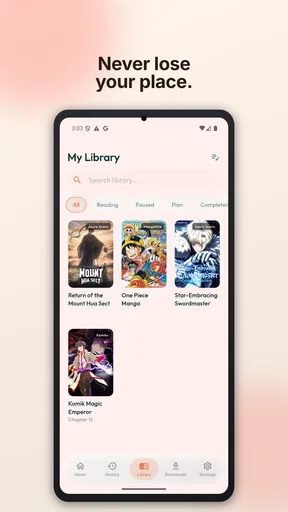
In my experience, synchronization has the clearest value for a reader who alternates between a phone and another Android device. Starting a chapter in one place and continuing elsewhere is a much better fit than remembering a title and manually finding the same page again. It can also help when a reader changes from a small screen to a larger one for a longer session. That is the kind of everyday convenience that makes a dedicated comic app feel worthwhile.
For shared use, however, synchronization introduces a question: whose progress is being synchronized? If the same login or app space is used by multiple readers, the feature may be convenient one moment and confusing the next. I would keep the primary reading workflow tied to one person wherever possible. If a household needs independent histories, it should verify how account separation works before relying on the app for that purpose rather than assuming the feature exists.
Another subtle trade-off is convenience versus visibility. A reader may appreciate not having to repeat searches or remember chapter positions, but shared devices make that continuity more exposed to others. The right choice depends on the household. Adults who are comfortable sharing a device may see no issue, while someone who wants a private reading trail will be better served by using a personal phone and keeping the app’s use separate.
Reader mode and the difference from ordinary browsing
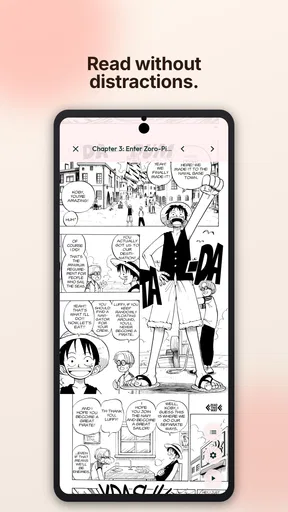
Reader mode is one of the more meaningful reasons to try this app instead of relying entirely on a browser. Comic pages need attention, and browser menus, unrelated tabs, and page layout differences can distract from the artwork. A dedicated reading view is intended to make the act of moving through a chapter feel more direct. For me, that matters most during short sessions, when I do not want to spend half the available time adjusting a web page.
It is also useful when a household member is not especially comfortable with browser-based reading. A focused app gives the device a clearer reading identity, which can be less intimidating than asking someone to manage tabs and site layouts. That said, readers who already have a trusted official manga service may prefer its established catalog, licensing arrangements, and account tools. EZ Manga’s appeal is convenience and browsing flexibility, not an automatic replacement for every dedicated publisher platform.
I would also keep expectations realistic about the word “smart.” It suggests a smoother way to browse and read, but it does not mean the app will perfectly understand every reader’s taste or eliminate all catalog friction. The best way to judge it is by actual workflow: can you find the kind of comics you want, read them comfortably, and return to them without unnecessary effort? If the answer is yes, the app earns its place. If your priority is a highly curated service with strong editorial organization, another option may feel more polished.
Age, trust, and responsible access
The age rating is not a minor footnote for this app. Because EZ Manga is intended for mature audiences, I would place it in the same category as any adult-oriented entertainment app when deciding where it belongs on a shared device. Parents should discuss access directly, and adults sharing a tablet should understand that the app is not something to install casually on a device used by children. A large screen in a common room can make content visible to people who did not choose to see it.
Trust also includes the sources a reader chooses to browse. I would encourage users to pay attention to where a title leads, whether a page behaves as expected, and whether a reading source feels reliable. A dedicated browser can simplify access, but it does not remove the need for ordinary online caution. Avoid entering sensitive information into unfamiliar pages, and do not assume that every result has the same quality or suitability simply because it appears inside a comics-focused app.
For adult households, the mature rating may be perfectly appropriate. For teenagers, the decision needs more nuance than the label alone. A responsible adult should consider the individual reader’s age, maturity, and ability to handle online content. EZ Manga may be a good fit for an adult manga fan who wants a convenient reader, but I would skip it as a recommendation for a young reader seeking a supervised introduction to comics.
Cost, version, and what to consider before committing
The free entry point lowers the risk of testing the experience. You can see whether browsing, reader mode, and synchronization fit your routine before deciding whether the app deserves regular use. There are in-app purchases ranging from $2.99 to $69.99 per item, so I would not let a child use a shared device with purchasing access left unattended. Adults should also review any purchase prompt carefully and decide whether optional spending adds enough value to their reading habits.
The current version, 1.0.50, suggests that the app is still a relatively focused product rather than a long-established household platform. That is not automatically negative; a lightweight app can be easier to understand. But I would keep an eye on how reliably it handles your particular device, especially if the tablet is older or used by several people. The minimum Android requirement of 7.0 is friendly to older hardware, yet compatibility on paper does not guarantee that every screen size or browsing source will feel equally smooth.
Its average rating is 3.4 from around 64 ratings, with four written reviews shown alongside the listing. I read that as a reason to approach it with measured expectations rather than as a decisive recommendation or rejection. There is enough interest to make testing worthwhile, but not enough public feedback for me to treat every edge case as settled. The app should earn trust through your own reading routine, particularly if it will be used across more than one device.
Who will appreciate it, and who should choose something else
I think EZ Manga is a sensible choice for an adult reader who wants a dedicated place to browse comics and use a more focused reading view. It is especially appealing if you move between devices, dislike keeping many browser tabs open, and want a simple way to return to ongoing reading. It can also suit adult roommates or couples who share a tablet casually, provided they understand that shared use may blur personal reading boundaries.
I would be more cautious about recommending it to a household that needs clearly separated profiles, child-focused controls, or a carefully managed family library. The app’s mature age context makes it a poor default for children, and a shared login or device can create confusion when several people expect private progress. In those cases, an official service with explicit family features or separate accounts may be a better fit, even if its browsing experience is less flexible.
It may also be the wrong choice for readers who care most about one publisher’s official catalog, offline reading arrangements, or a tightly curated subscription experience. EZ Manga is attractive because it brings browsing and reading together, but that convenience should not be confused with guaranteed superiority over specialized alternatives. If your favorite series is already served well by an official app, staying there may provide a cleaner and more dependable experience for that specific title.
My household verdict
After looking at it through a shared-device lens, I see EZ Manga as a useful personal reader that can work in a household when everyone sets sensible boundaries. Its strongest qualities are the focused comics experience, reader-oriented presentation, and the promise of keeping reading more continuous across devices. Those strengths are practical rather than flashy: they matter when you have only a few minutes to read or when you are tired of rebuilding the same browsing session.
The main caution is not that the app is difficult; it is that household sharing can make a personal reading tool behave like an informal communal library. I would keep adult access clear, avoid assuming that synchronization separates people, and protect purchasing decisions on any device used by younger family members. Those steps make the experience more predictable without pretending that the app offers family management features that are not part of its central identity.
With over 10 thousand installs, EZ Manga has found an audience, though its 3.4 average means I would test it rather than recommend it blindly. For an adult manga, webtoon, or manhwa reader who wants a free starting point and a more comfortable alternative to scattered browser tabs, it is worth trying. My final view is positive but specific: choose it for focused personal reading and flexible browsing, not as a replacement for household account management.
Pros
- Large catalog of manga
- manhwa
- and webtoons in one app.
- Smooth scrolling makes long chapters comfortable to read.
- Regular updates help users discover newly released episodes.
- Bookmarking makes it easy to keep track of favorite series.
- Simple interface is easy for new readers to navigate.
Cons
- Some titles or chapters may be unavailable in certain regions.
- Free access can include ads or other reading interruptions.
- Translation quality may vary between different series.
- The catalog may focus more on popular titles than niche works.
- Some features may require an account or in-app purchases.
FAQs for EZ Manga: Webtoon & Manhwa
What is EZ Manga: Webtoon & Manhwa?
EZ Manga: Webtoon & Manhwa is a reading app designed for fans of digital comics, including manga, manhwa, and webtoons. It brings serialized stories into a mobile-friendly interface where readers can browse available titles, open chapters, and continue following ongoing series. Before downloading, users should check whether the catalog, language options, and content availability match their personal preferences and region.
Is EZ Manga: Webtoon & Manhwa free to download and use?
The application may be available to download at no initial cost, but that does not necessarily mean every feature or chapter is completely free. Depending on the title and the app’s current business model, users may encounter advertisements, optional purchases, locked chapters, or other limitations. It is advisable to review the store listing and in-app purchase information before committing to a long reading session.
Does EZ Manga: Webtoon & Manhwa offer manga and manhwa in English?
Language availability can vary by title, publisher, licensing arrangements, and the user’s location. While the app focuses on manga, manhwa, and webtoon-style content, not every series is guaranteed to include an English translation. Readers should inspect the description, chapter listings, and language information for individual titles, especially if they specifically want official English releases rather than translated or user-submitted material.
Can I read comics offline with EZ Manga: Webtoon & Manhwa?
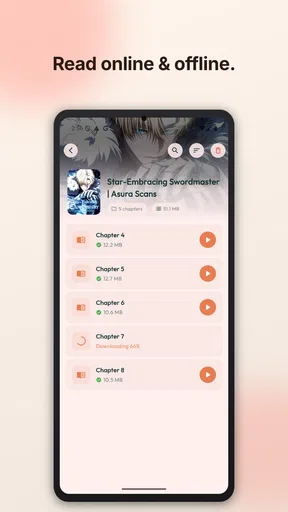
Offline reading depends on the features currently provided by the application and on how each title is delivered. Some reading apps allow chapters to be cached or downloaded, while others require an active internet connection every time content is opened. Users should look for a download or offline option inside the reader and remember that downloaded chapters may use considerable storage and could expire or require periodic verification.
Is EZ Manga: Webtoon & Manhwa safe for children and all readers?
The app’s suitability depends on the content included in its catalog, since manga and webtoons can cover light comedy, romance, violence, mature themes, or explicit subjects. Parents should review the app-store age rating, privacy information, and individual series descriptions before allowing children to use it. Readers should also check requested permissions and avoid providing unnecessary personal information during registration or use.


